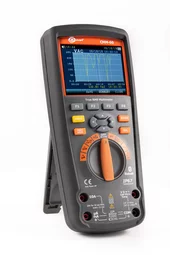
Sonel CMM-60 Multimeter Software
Index: WAPROCMM60MS
The Sonel CMM-60 Multimeter Software program is designed for cooperation with the Sonel CMM-60 multimeter
Basic in product
Files
- Basic in product
- Files
- Sonel CMM-60 Multimeter Software (current version) (1.3.2)changelogcomments
ATTENTION!
For Windows 7 and older systems, and in cases where there is no built-in BT module, use the older version of Sonel CMM-60 Multimeter Software (1.2) and the CMM-RR adapter (WAADACMMRR).
Changes in version 1.3.2 compared to the previous version:
- Fixed bug with retrieving data from CMM-60 memory.
Changes in version 1.3.1 compared to the previous version:
- Bluetooth 5.2 LE support.
- New method of wireless connection to Sonel CMM-60, directly via the built-in Bluetooth module in the computer.
- Automatic reconnection after disconnection, including after passing through the position that turns off the Sonel CMM-60 device.
For Windows 7 and older systems, and in cases where there is no built-in BT module, use the older version of Sonel CMM-60 Multimeter Software (1.2) and the CMM-RR adapter (WAADACMMRR). - Sonel CMM-60 Multimeter Software (previous version) (1.3.1)changelogcomments
ATTENTION!
For Windows 7 and older systems, and in cases where there is no built-in BT module, use the older version of Sonel CMM-60 Multimeter Software (1.2) and the CMM-RR adapter (WAADACMMRR).
Changes in version 1.3.1 compared to the previous version:
- Bluetooth 5.2 LE support.
- New method of wireless connection to Sonel CMM-60, directly via the built-in Bluetooth module in the computer.
- Automatic reconnection after disconnection, including after passing through the position that turns off the Sonel CMM-60 device.
For Windows 7 and older systems, and in cases where there is no built-in BT module, use the older version of Sonel CMM-60 Multimeter Software (1.2) and the CMM-RR adapter (WAADACMMRR).